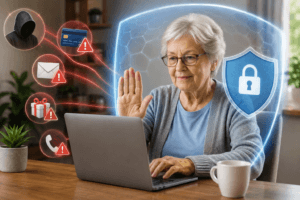
Protecting seniors from online scams is really important right now. The number of online scams targeting older adults is rising fast in 2026. With more seniors using the internet for shopping, banking, and staying in touch, scammers are getting bolder and more creative. Awareness is key, both for older adults and for anyone who wants to help keep them safe.
Why Online Scams Target Seniors in 2026
More seniors are online now than ever before, whether it’s FaceTiming with grandkids, ordering groceries, or just catching up on news. With that extra time online, exposure to scammers is greater. Scammers know that older adults may have regular income, a lifetime’s worth of savings, and sometimes less familiarity with new digital threats. They purposely target these vulnerabilities and often send emails or make calls that sound urgent or official.
Technology has made scams look much more believable these days. AI-generated voices, deepfake video calls, and professional-looking phishing emails are almost everywhere. Even folks who are usually careful can end up fooled. That’s why practical, real-world advice for protecting seniors from online scams matters so much. You and your loved ones can feel more confident staying safe online by sticking to some up-to-date tips and habits.
Top Scams Targeting Seniors Online
Knowing which scams are popular in 2026 helps you spot the danger before it gets serious. Here are some of the most common schemes I’ve seen targeting seniors online lately:
- Phishing Emails: These look like real messages from your bank, the government, or a popular retailer, but they’re meant to trick you into sharing account numbers, passwords, or other personal info. The links usually lead to fake websites, ready to capture anything you type.
- Tech Support Scams: You get a pop-up or a call that says your computer’s infected, and the so-called “support agent” asks for remote access or payment. Some scammers freeze your device until you pay up.
- Romance Scams: Scammers use dating sites or social media to build fake relationships. Then, after gaining trust, they claim to have an emergency and ask for money or sensitive details.
- Fake Tech/Banking Calls: These calls might say there’s a problem with your account or device and ask you to confirm sensitive info. Caller ID spoofing means these scams sometimes look like they’re coming from real companies.
- Grandparent Scams: Someone pretends to be a grandchild or relative in trouble. They’ll beg for money and ask you not to tell anyone else, usually through calls or urgent messages.
- Investment and Crypto Fraud: Promises of huge profits from “can’t-miss” investments, especially crypto. Fraudsters set up legit-looking websites and pressure targets to act fast.
Seniors Online Safety Tips 2026
Staying safe online doesn’t have to be complicated. There are some fresh habits that really make a difference when protecting seniors from online scams. Here’s my best advice tailored for 2026:
- Create Strong, Unique Passwords: Go for passwords with a mix of letters, numbers, and symbols. If possible, avoid pet names or favorite colors, and do not use the same password for different accounts. Password managers are worth checking out. They store your login info securely so you don’t have to remember every detail.
- Turn On Two-Factor Authentication (2FA): 2FA adds a second layer of security, like a code texted to your phone when logging in. Most banks and email services offer this for free. Even if a scammer gets your password, 2FA can block them from breaking in.
- Double-Check Suspicious Links or Attachments: Hover your mouse over any link to see the real web address. If you get a random email or text claiming to be from a company, avoid clicking; go directly to their official website or call their main number for help.
- Verify Callers Before Sharing Info: If someone calls and asks for personal details, let them know you’ll call them back at the customer service number listed on your bank statement or the company’s website. Scammers pressure you to act fast, but taking a minute to check saves a lot of grief.
- Avoid Oversharing on Social Media: Details like your birthday, address, or pet name can be used to guess passwords or security answers. Keep privacy settings tight, and be careful with new friend requests from people you don’t know.
Guide to Protect Seniors from Scams: A Step-by-Step Checklist
Family members and caregivers play a big role in helping seniors keep their digital lives secure. Here’s a step-by-step checklist you can use together:
- Secure Devices and Accounts: Set up password protection for computers, smartphones, and tablets. Change passwords on any old accounts, and think about using a password manager for easier, safer logins.
- Update Software and Apps: Turn on automatic updates for operating systems, browsers, and key apps. Updates patch security gaps and help keep out new types of malware.
- Enable Scam and Spam Filters: Most email providers have filters to catch scam and spam messages; double-check that these are active.
- Set Up Call Blocking: Register landlines and mobile phones with the National Do Not Call Registry. Many smartphones and cordless home phones now have built-in scam call blocking that helps reduce unwanted calls.
- Monitor Financial Accounts: Set up alerts for transactions over a certain amount, or log in together weekly to review recent activity. Monitor for any unexpected charges or withdrawals.
- Teach About Red Flags: Practice spotting warning signs, like urgent requests for payment, strange or stilted language, or odd questions. Remind loved ones that real companies won’t ever pressure you to send gift cards or wire cash.
- Have a Clear Reporting Plan: Decide ahead of time what you’ll do if a suspicious message, call, or charge crops up. Keep emergency contact info handy for acting quickly if needed.
Best Online Safety Programs for Seniors
There are some eye-catching programs and apps that can really give a boost to seniors’ online safety. Here’s a quick overview that might help you or someone you care about to get started:
| Program or Tool | What it Does | Pros | Cons |
|---|---|---|---|
| AARP Fraud Watch Network | Education, scam alerts, and a helpline specifically for seniors | Free, reputable, lots of resources and personal support | No automatic spam or scam filtering |
| Norton 360 or McAfee Total Protection | Real-time antivirus, scam and phishing site blocking, device protection | Automatic alerts, covers multiple devices, solid track record | Subscription fees; some features are complex |
| Elder Fraud Prevention Software (OneRep, Aura, etc.) | Monitors the dark web, alerts users to risky changes to accounts, sends privacy reports | Proactive alerts for sketchy activity, simple dashboards | Monthly fees, some tech setup required |
| Community Classes and Libraries | Group or one-on-one help with internet basics and safety | Personal, interactive, good for questions | Not always local, may depend on teacher availability |
If you’re not sure where to start, local senior centers or libraries often have workshops or group classes that cover internet basics and safety. It’s a great way to meet people, ask questions, and stay up to date with the latest scam trends.
How to Report Online Scams for Seniors
If you or a loved one suspects a scam, reporting it helps stop future fraud and increases your chances of recovering lost money sooner. Here’s where and how to report:
- Federal Trade Commission (FTC): File a complaint online at reportfraud.ftc.gov. You’ll get a case number and next steps.
- FBI Internet Crime Complaint Center (IC3): Use ic3.gov to report online fraud or cybercrime. IC3 is especially helpful for losses due to phishing, identity theft, and significant scams.
- Local Police: For immediate threats or large losses, call your local police. Police can open an investigation and help with paperwork for insurance or the bank.
- Bank or Credit Card Company: If money got sent or cards were compromised, call the number on the back of your card immediately. Banks usually have fraud hotlines and can freeze accounts or help reverse charges if you act quickly.
Information that’s helpful to have ready: dates and times, scammer’s phone numbers or emails, original messages, websites or links sent, and proof of any payments or transfers. This will help authorities track the scam and give you better advice on next steps.
Frequently Asked Questions
Is it safe for seniors to shop or bank online in 2026?
Yes, as long as you use official websites, strong passwords, and stay alert for fake emails or phone calls. Keeping software updated and using transaction alerts makes online banking and shopping much safer for older adults.
What’s the best way to help an older loved one who isn’t tech-savvy?
Set up their device together, walking through features like password managers, call blocking, and scam filters. Encourage them to ask questions and check in regularly about anything that seems odd.
Are there penalties for reporting a scam by mistake?
No, there are no penalties for reporting something you later realize wasn’t a scam. Reporting helps everyone; it’s better to be safe than sorry.
Protecting Seniors from Online Scams and Fraud: Moving Forward
Keeping seniors safe from online scams is completely doable with the right information and a few smart habits. If you have an older loved one, consider sharing this guide or bookmarking reporting resources. A little preparation now really pays off later, giving everyone more peace of mind every time they go online.
Plus, technology is always changing, so staying in the loop with updates and new scam alerts can make all the difference. Encourage open chats about any suspicious calls or messages, and remind your loved ones that asking for help is smart, not a bother. Staying sharp and working together is the easiest way to set yourself up for safe online experiences in 2026 and beyond.

This article was created with AI assistance and reviewed by a human editor.